Installation
BrandManager is a ScriptUI Panel, which means it runs directly inside the After Effects interface as a dockable panel.
- Download
BrandManager.jsx from this page.
- Locate your After Effects ScriptsUI Panels folder:
- Windows:
C:\Program Files\Adobe\Adobe After Effects [version]\Support Files\Scripts\ScriptUI Panels\
- macOS:
/Applications/Adobe After Effects [version]/Scripts/ScriptUI Panels/
- Copy
BrandManager.jsx into that folder.
- Restart After Effects.
- Open the panel via Window > BrandManager.jsx.
Pro Tip: You can dock the panel alongside your Project panel or Effects & Presets for quick access during every project.
Adding a New Brand
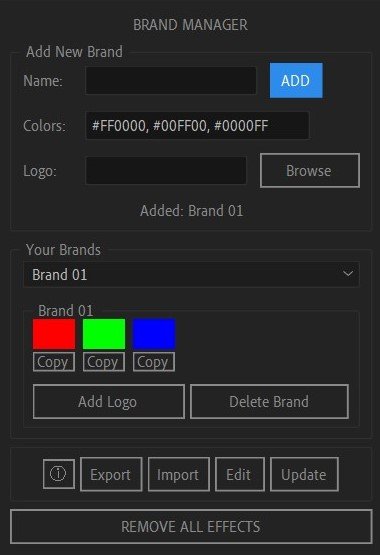
The "Add New Brand" section at the top of the panel is where you build your brand library.
- Name: Type the brand name (e.g., "Client A", "My Startup"). This is required.
- Colors: Enter hex codes separated by commas. Example:
#E9B131, #1A1818, #FFFFFF. You can add up to 8 colors.
- Logo: Click "Browse" to select a logo file (PNG, JPG, AI, EPS, SVG supported). The full file path will appear in the field.
- Click ADD. The brand appears instantly in the dropdown and card view.
Note: If you enter more than 8 colors, BrandManager keeps only the first 8 and shows a warning.
Applying & Copying Colors
Each brand card displays its colors as visual swatches arranged in rows of 4.
- Click a swatch — applies a Fill effect (ADBE Fill) to the currently selected layer with the exact hex color converted to RGB.
- Click "Copy" below any swatch — copies the hex code to your clipboard via a helper dialog. Just press Ctrl+C and close the window.
Requirements for applying colors:
- You must have a composition open (activeItem).
- You must have at least one layer selected in that composition.
If either condition isn't met, BrandManager shows an alert explaining what's needed.
Importing Logos
If a brand has a logo path saved, the card shows an "Add Logo" button.
- Clicking it imports the logo file into your active composition as a new footage layer.
- The layer is automatically named "Brand Logo" and centered at
[comp.width/2, comp.height/2].
- Supported formats: PNG, JPG, JPEG, AI, EPS, SVG.
Tip: The logo import uses standard After Effects import options, so vector files (AI/EPS) will import at their original document size.
Editing & Deleting Brands
Managing your library over time is straightforward:
- Edit: Select the brand from the dropdown, then click the "Edit" button in the toolbar. The brand's data loads back into the Add New Brand fields. Modify and click "SAVE".
- Delete: Each brand card has a "Delete Brand" button. Clicking it removes the brand from the library and auto-saves the updated data.
All changes are written to BrandManager_Data.json in your system's user data folder immediately.
Export & Import JSON
BrandManager uses a clean JSON format for portability:
[
{"name":"My Brand","colors":["#E9B131","#1A1818","#FFFFFF"],"logo":"C:/Logos/logo.png"}
]
- Export: Click "Export" in the toolbar, choose a save location, and BrandManager writes a formatted JSON file.
- Import: Click "Import", select a JSON file, and the entire brand library is replaced with the imported data.
Use Case: Export your brand library before reinstalling After Effects or moving to a new machine. Import it back and everything is restored.
Remove All Effects
The "REMOVE ALL EFFECTS" button at the bottom of the panel is a quick reset tool:
- Select any layer in your composition.
- Click the button.
- Every effect on that layer is removed in a single undo group.
This is useful when you want to strip a layer clean before applying a new brand color or effect stack.
Tips & Best Practices
- Dock the panel on the right side of your workspace alongside Effects & Presets for the fastest workflow.
- Use short brand names — they display better in the dropdown and card headers.
- Keep logos in a fixed folder so paths don't break when you move projects between machines.
- Export before major AE updates — just in case user data paths change.
- Combine with expressions — after applying a Fill color, link other layers to the Fill color property via expressions for true brand consistency.
Troubleshooting
Panel doesn't appear in Window menu: Make sure the file is in Scripts/ScriptUI Panels/, not the regular Scripts/ folder. Restart AE.
"Open a Comp first!" error: You need an active composition (timeline open) to apply colors or import logos.
"Select a layer first!" error: Click a layer in your timeline before clicking a color swatch.
Colors not applying: Ensure your hex codes start with # and contain 3 or 6 valid characters. Example: #E9B131 or #FFF.
Logo not importing: Verify the file path is still valid. If you moved the logo file, use Edit to update the path.
Data lost after AE reinstall: The JSON is stored in your user data folder. Back it up via Export before reinstalling.